“I really, really, really feel very strongly that playlists are going to be a huge thing for us,” Jon F. Daily said in our bandNada company conference call on April 6th, 2026 (which he arrived 20 minutes late to).
Quickly, we moved on. But Jon was onto something!! bandNada playlists are a great way to experience and share music by your favorite neighborhood bands. In an age where algorithms often choose our listening for us, playlists give you a chance to listen and share songs on your own terms. How much cooler is that on a locals-first platform? It’s the 2026-equivalent to burning a CD or making a mixtape of your favorite local bands–bringing the community back to this sacred practice, and removing the corporation.
How to Build a Perfect Playlist
It’s been requested that I speak to the “journey” of building a playlist. AKA the art of it. I’ve devoted many hours to this while avoiding boring adult responsibilities, such as taxes or my job. Here’s what I’ve learned:
The Length - How long the listening time is
The Girth - How many songs
The Motion of the Ocean - How well it flows from song to song
The Substance - Why are we even here in this moment? And who are you?
The perfect playlist for me may not be the perfect playlist for you. For me, great playlists are composed of 24 songs (the number of tracks I could burn onto a mix CD in high school). I find myself ordering the tracks like an album, with each song’s place being earned by the one before it, and the first song coming out with a bang.
For you, it may be different. Maybe you treat it like a movie soundtrack. Maybe you don’t give a shit about the order at all. Your playlist might contain 2 songs, or it might contain 2000.
If you need a place to start, may I suggest following Zoe Kravitz past the fourth wall in Hulu’s newer High Fidelity series, shown below.
Disclaimer: Playlists are a social construct. There are no actual rules. We will all die someday.
How To Make a Playlist on bandNada
A bandNada playlist has several components. They are as follows.
1. Playlist Title
2. Cover Image
3. Songs
4. Shareability
Many-a-great playlist has a theme. For instance, my playlist, up the punx 🧷‼️ is themed around artists that sound like they’re Leftover Crack fans. “Up the punx” is something that punk rockers say when drinking forties or smashing cop cars. It’s cool.
How to make a bandNada playlist on Desktop
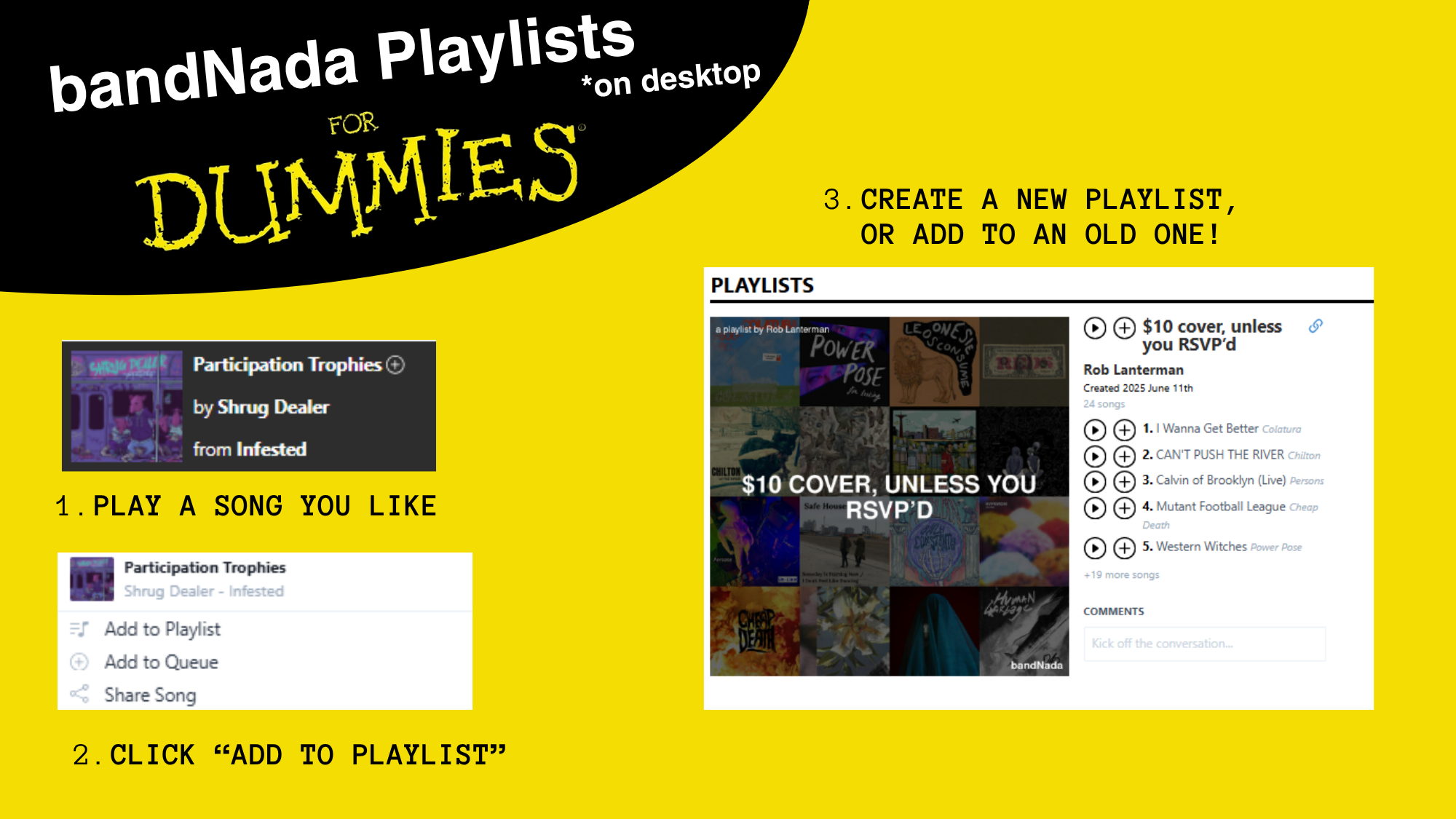
First, you play a song you like. For me, an egomaniac, this is probably a song by my band. Then do the following:
- Hover over the song name with your mouse in the player, then click the little “+” sign.
- A window will pop up that allows you to “Add to Playlist.”
- From there, you can make a new playlist, or add it to one you’ve already made. - Celebrate!
Then, go to your profile by clicking in the top right, where if you scroll down you’ll be able to see your playlists. From here, you can hold the little bar next to the track numbers and move songs around. If you click on the picture, then you can edit it. Just press the piss yellow bar under the picture. THIS IS HOW YOU ORDER YOUR PLAYLIST TO PERFECTION!
Watch the videos above to see how this all works.
How to Make a bandNada Playlist on Mobile
Repeat the steps above but do it from your phone.
…
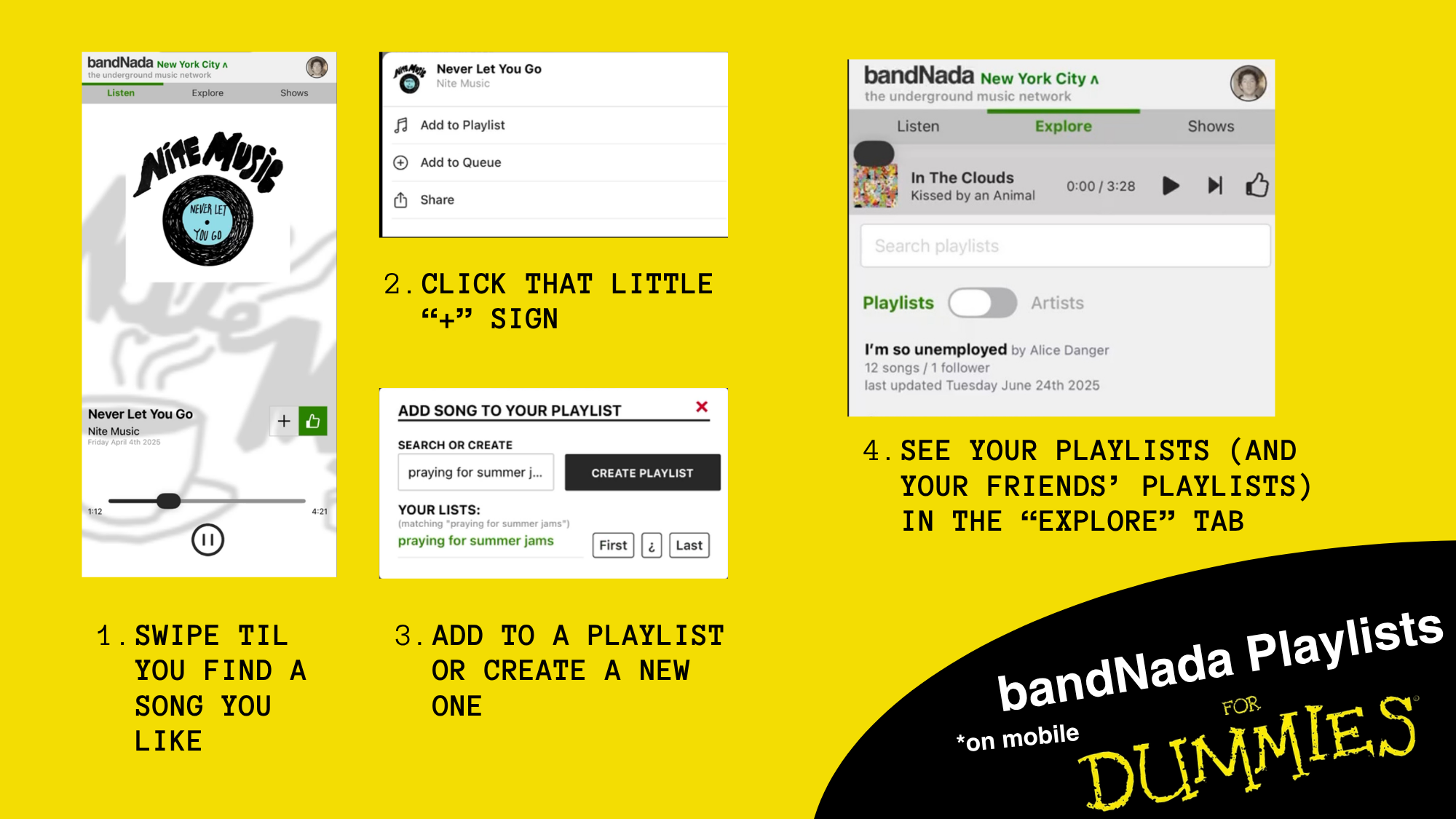
JUST KIDDING. We at bandNada believe in responsive design and safe mobile app development.
- Tinder your way through our database, swiping and whatnot. Eventually, you’ll find something you like (I promise).
- Click the "+" sign next to the Facebook-looking thumbs up.
- **Click "add to playlist” next to the itunes-looking music sign.
- From there, you can either enter a name and make a new playlist, or add the song to one of your previous ones below by clicking the name of it.
And there you have it! Now you know how to make a playlist on bandNada. Make it so I’m not a sad little potato later. Email me at rob@bandnada.com if you have questions. Toodles!
.png)